
Cyber Security Awareness Poster
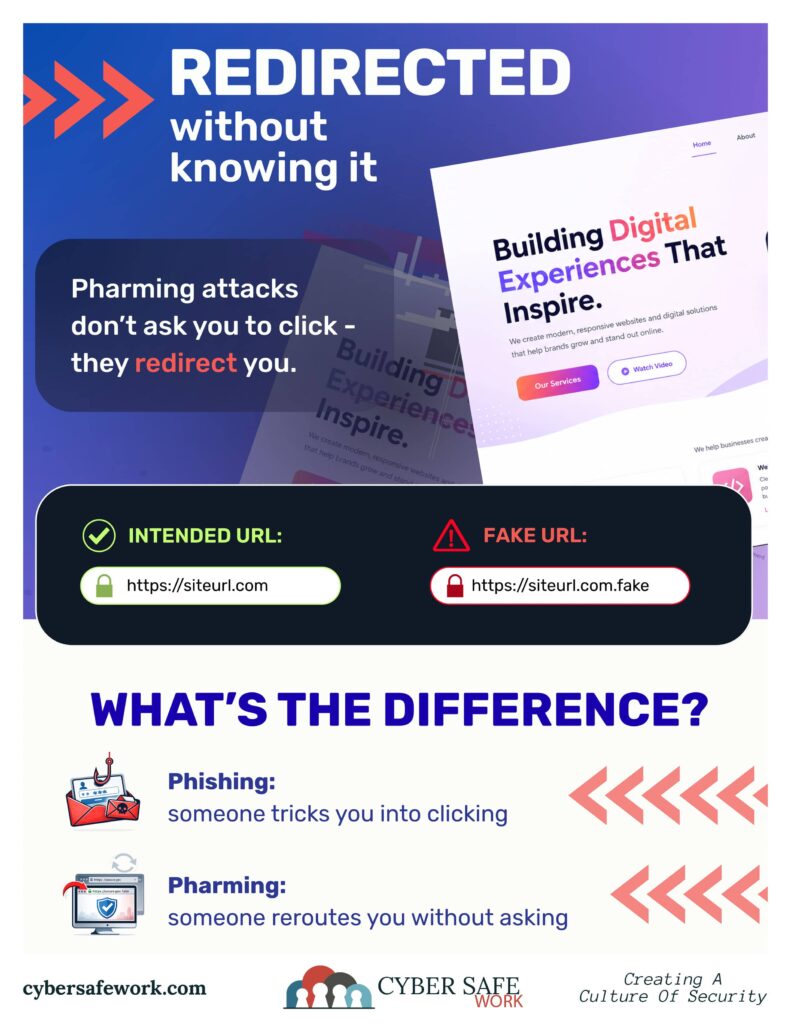
What Is a Pharming Attack? How Fake Websites Secretly Redirect Users
Most people know to avoid suspicious emails and strange links. But what if you visited a fake website without ever clicking anything suspicious at all?
That’s the danger behind a pharming attack.
Unlike phishing, which relies on tricking someone into clicking a malicious link, pharming silently redirects users to fraudulent websites even when they type the correct web address. The result can be stolen passwords, compromised financial accounts, and unauthorized access to sensitive systems.
For municipalities, small businesses, and organizations that rely on online portals and trusted websites, understanding pharming is becoming increasingly important.
What Is Pharming?
Pharming is a type of cyberattack that redirects internet users from legitimate websites to fake ones without their knowledge.
These fake sites are often designed to look nearly identical to the real website. Once users enter their login credentials or sensitive information, attackers can capture that data and use it for fraud, identity theft, or further attacks.
In simple terms:
- Phishing tricks you into clicking a bad link
- Pharming reroutes you behind the scenes
That’s what makes pharming especially dangerous. Users may believe they are taking all the right precautions while still being redirected to a malicious site.
Example of a Pharming Attack
Imagine an employee types:
www.city-portal.gov
Instead of reaching the real portal, the user is secretly redirected to:
www.city-portal-secure.gov.fake
Chances are criminals will go to the trouble of making their site look as real as possible. The fake site may:
- Use the same logo
- Match the colors and layout
- Copy the login page
- Display a padlock icon
To the average user, everything appears normal.
Once credentials are entered, attackers may gain access to:
- Email accounts
- Financial systems
- Resident portals
- Vendor accounts
- Internal government resources
Why Pharming Is So Effective
Pharming works because it attacks trust. People are taught to:
- Avoid suspicious links
- Check for spelling mistakes
- Look for HTTPS security
But pharming can bypass many of those habits because users may still type the correct address themselves, making the attack feel invisible.
Organizations that rely heavily on public trust, such as municipalities, utilities, schools, and small businesses, can become especially vulnerable because residents and customers are accustomed to using familiar online portals.
Common Signs of a Fake Website
While pharming sites can be convincing, there are often subtle warning signs.
Watch for:
- Slightly altered domain names
- Extra words in the URL
- Unusual redirects
- Login pages that suddenly look different
- Security certificate warnings
- Requests for unusual information
Examples:
borough-services.govborough-services-secure.comborough-services.gov.fake
At a glance, these may look legitimate.
How Businesses and Municipalities Can Reduce the Risk
Preventing pharming attacks requires both technical protections and employee awareness.
Secure Your DNS
DNS filtering and DNS security tools can help block malicious redirects before users reach fake websites. This is probably too complicated for the average person. Partnering with a tech expert you trust can help.
Keep Devices Updated
Outdated routers, computers, and network devices may contain vulnerabilities attackers can exploit. This, too, probably requires an IT professional.
Use Multi-Factor Authentication (MFA)
Even if credentials are stolen, MFA can help prevent unauthorized access.
Train Employees
Cybersecurity awareness training remains one of the most effective defenses. Staff should know how to recognize suspicious redirects, unexpected login prompts, and unusual website behavior.
Monitor Website Traffic
Organizations should regularly monitor their domains, SSL certificates, and traffic patterns for signs of spoofing or unauthorized changes.
Pharming vs. Phishing: What’s the Difference?
Even though giant “Hollywood-style” pharming attacks are less common than phishing, with organizations relying more on cloud portals, users trusting browser autofill, and people rarely inspecting URLs carefully anymore, redirect-based attacks are increasingly effective. Criminals may also combine pharming with other types of attacks, like:
- phishing
- fake MFA prompts
- credential harvesting
- AI-generated spoofed websites
So the concept is evolving rather than disappearing. Because education is a huge component to protection, here’s a quick review of the difference between phishing and pharming.
| Phishing | Pharming |
|---|---|
| Relies on deceptive emails or messages | Redirects users automatically |
| User clicks a malicious link | User may type the correct address |
| Often easier to spot | Often invisible to the victim |
| Targets user behavior | Targets internet infrastructure |
Both attacks aim to steal information, but pharming is often more difficult for everyday users to detect.
CourseVector grants permission to use this artwork for any non-commercial purpose as long as the CourseVector contact information remains, as is, on any reproduction or use.
