
Cyber Security Awareness Poster
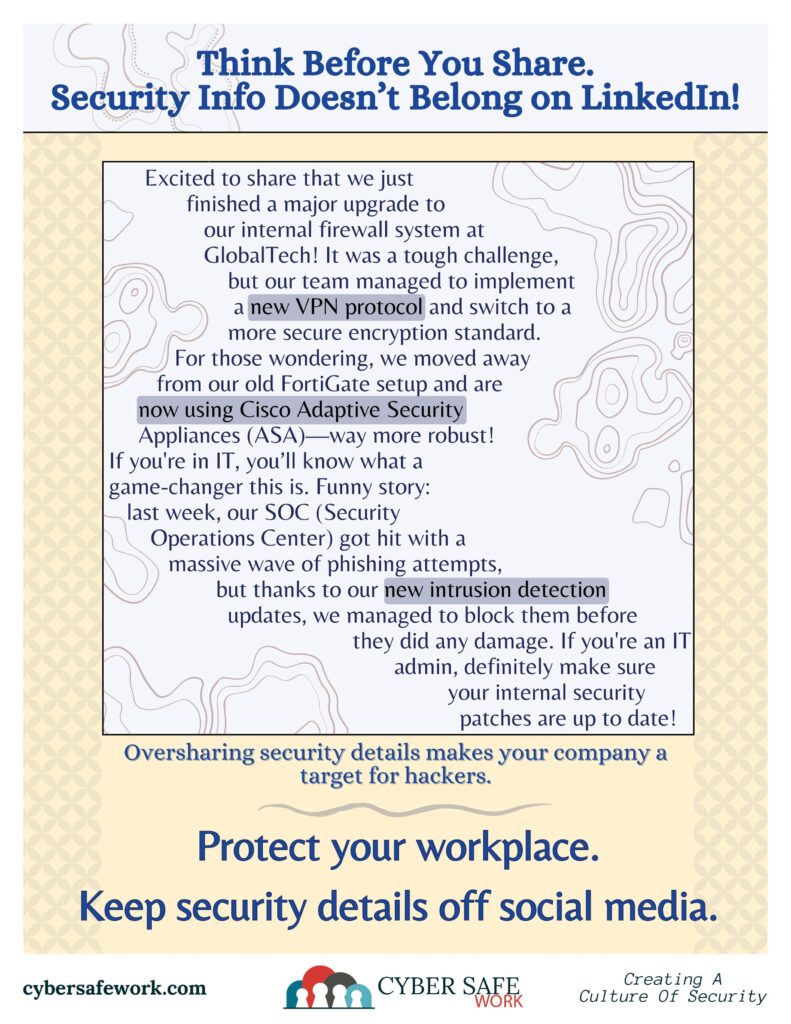
STOP! Your Security Info Doesn’t Belong on LinkedIn
Sharing detailed security information on LinkedIn can inadvertently expose your organization to significant cybersecurity threats. While it’s natural to highlight your professional achievements, disclosing specifics about security protocols, software, or internal systems can provide malicious actors with the insights they need to exploit vulnerabilities.
The Risks of Oversharing on LinkedIn
- Facilitating Social Engineering Attacks – Cybercriminals often engage in social engineering, manipulating individuals into divulging confidential information. By analyzing details shared on LinkedIn, such as job roles and project specifics, attackers can craft convincing phishing emails or impersonate trusted contacts. This tactic has been identified as a significant threat vector in cybersecurity.
- Unintentional Data Exposure – Even seemingly harmless posts can reveal critical information. For instance, mentioning the implementation of a specific security software or an upcoming system upgrade can alert attackers to potential entry points or periods of vulnerability. Such inadvertent disclosures have been linked to increased risks of data breaches.
- Targeting Through Fake Profiles – LinkedIn has been exploited by malicious actors creating fake profiles to connect with professionals and gather sensitive information. These impostors may pose as recruiters or industry peers, luring users into sharing proprietary data. This method has been documented as a prevalent strategy among cybercriminals.
Best Practices to Protect Your Information
- Limit Details in Public Profiles: While it’s beneficial to showcase your skills and experience, avoid sharing intricate details about your organization’s security measures, software used, or internal processes.
- Adjust Privacy Settings: Regularly review and update your LinkedIn privacy settings to control who can view your information and posts. Restrict access to your connections and be cautious about accepting invitations from unknown individuals.
- Be Cautious with Posts and Comments: Before sharing content, consider whether the information could be used maliciously. When in doubt, err on the side of caution and refrain from posting.
- Educate Colleagues and Employees: Promote awareness about the risks of oversharing on social media platforms. Regular training sessions can help reinforce the importance of maintaining operational security online.
By being mindful of the information you share on LinkedIn, you can help protect yourself and your organization from potential cybersecurity threats. Remember, maintaining a professional online presence doesn’t require divulging sensitive details.
CourseVector grants permission to use this artwork for any non-commercial purpose as long as the CourseVector contact information remains, as is, on any reproduction or use.
