Website design has moved from its very functional roots to a very visual medium. Even government websites benefit from eye-catching images that compliment their news posts online. But, it can be tricky getting the images to just the right size.
There are some reliable free tools that can help you to create stunning and cohesive featured images for your website. But, there are a few things to keep in mind before we begin.
Sites display differently depending on the device. – You may crop an image to fit perfectly on desktop only to find out that it’s quite wonky when displayed on a mobile device.
Aspect ratios are important. – Just like the saying goes, you cannot fit a square peg in a round hole. It is difficult to make a portrait image fit into a landscape-sized hole and vice versa. Choose your images wisely.
Cropping images
While most people don’t mind featured images that don’t quite fit into their allotted space, some people need their graphics to be perfectly sized. This usually means that you’ll need to crop the images before uploading them to the website. Photoshop is the go-to when you need to edit photos. However, there are some free options as well. The Be Funky Photo Editor allows you to crop images and might be a good option if you don’t need to do much else with the photos. It does have a paid version if you need to more than just crop photos!
While you don’t always need to have the exact image size, you do need to have the right aspect ratio. Something else to keep in mind is that you can make large images smaller. But, you cannot make small images larger without losing quality. Start with a good quality, large image and shrink it down to fit. 1200px by 628px and larger is a good place to start.
Kapwing free image-cropping tools available online.
Creating graphics
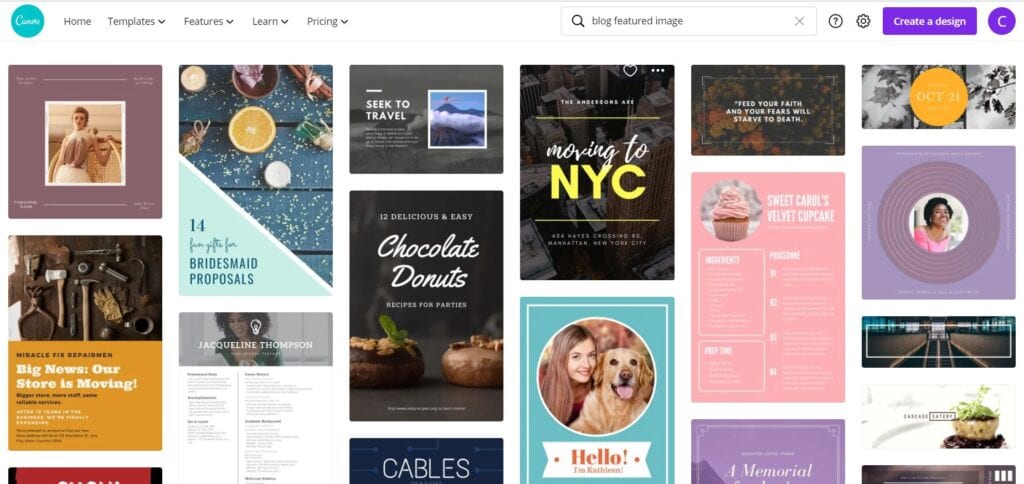
Canva is a free online graphics creator that allows you to make graphics for your news posts and more! The best part about canva is that you can use one template for all of your features images so that they are all uniform. You can upload your own images if you can’t find one in their free library. Need more? They offer a paid version that gives you even more choices.
Finding photos
Pixabay is a great option to find free stock photography. While their selection is somewhat limited, we find that it works really well. You may just need to get creative on your searches. Of course there are plenty of paid stock photography site available as well, like Big Stock Photography and iStock Photography.
Just can’t get it right?
If all else fails, contact your website developer. They may be able to point you in the right direction as far as size and aspect ratio is concerned. Of course, if you just don’t have the time or patience to crop your own images, your website designer should be able to help.
Looking for more on choosing images for your website?